
Case Management System for a Healthcare Services Company
Scaling Complex Healthcare Operations with Microsoft Dynamics 365, Workflow Automation, and a HIPAA-Compliant Architecture

A national healthcare services organization managed complex, time-sensitive operational cases involving organ procurement organizations, transplant centers, surgeons, donors, clinical personnel, transportation, supplies, medical devices, billing, and other critical activities.
The organization's original case-management process relied heavily on Excel spreadsheets and manual coordination.
That approach could function at lower case volumes, but it could not scale with the organization's growth. As volume increased, employees had to coordinate more cases, participants, deadlines, activities, and information using processes that depended heavily on spreadsheets, email, manual follow-up, and individual knowledge.
Stackular designed and implemented a centralized case-management platform using Microsoft Dynamics 365 Customer Service, Microsoft Dataverse, and Power Automate.
Workflow automation, centralized information, structured business rules, and real-time case visibility allowed the organization to substantially increase operational capacity without increasing staffing at the same rate.
This scalability was critical to supporting the organization's revenue growth. At the resulting case volumes, continuing to operate through Excel-based processes would have required significantly more staff and would not have provided the operational controls necessary to manage the workload effectively.
Because the system manages Protected Health Information (PHI), Stackular also designed the application as part of the organization's HIPAA-compliant technology architecture, incorporating controlled access, auditing, encryption, and governance around sensitive healthcare information.
The Challenge
The organization's case-management process coordinates a highly specialized healthcare operation.
A single case can involve multiple external organizations, clinical personnel, logistical activities, decisions, deadlines, supplies, devices, and financial information.
Information associated with a case can include:
- requesting organizations
- organ procurement organizations
- transplant centers
- surgeons and assistants
- donors
- organ type
- organ disposition
- preservation devices
- transportation
- travel schedules
- supply kits
- medical and operational activities
- case outcomes
- follow-up activities
- billing status
Originally, much of this work was coordinated through Excel and manual processes.
As the business grew, that approach created fundamental scalability limitations.
Employees needed to determine:
- what had already happened
- what still needed to happen
- who was responsible
- which organization was involved
- whether required information had been received
- whether transportation was arranged
- whether clinical personnel had been secured
- whether supplies were available
- what the current case disposition was
- what information was still required before completion or billing
At low volumes, experienced employees could compensate for process limitations through institutional knowledge and manual coordination.
At hundreds of cases per day, that operating model was no longer practical.
The organization needed to increase operational capacity significantly without increasing staffing at the same rate as case volume.
From Spreadsheet-Based Tracking to Operational Case Management
The core problem was not simply that Excel was an outdated technology.
The larger problem was that spreadsheets were being asked to function as a multi-user enterprise case-management system.
Excel could store information, but it was not designed to provide:
- workflow orchestration
- role-based security
- automated assignments
- case ownership
- audit history
- structured business relationships
- activity tracking
- process automation
- exception management
- real-time operational queues
- integrated reporting
- governed PHI access
As the organization grew, the limitations became increasingly important.
Adding more spreadsheet rows did not create more operational capacity.
The business needed to convert its operating process into a structured system that could help employees manage substantially more work.
Stackular's Approach
Stackular used Microsoft Dynamics 365 Customer Service and Dataverse as the foundation for the new operational platform.
Instead of building every common enterprise capability from scratch, Dynamics provided foundational services including:
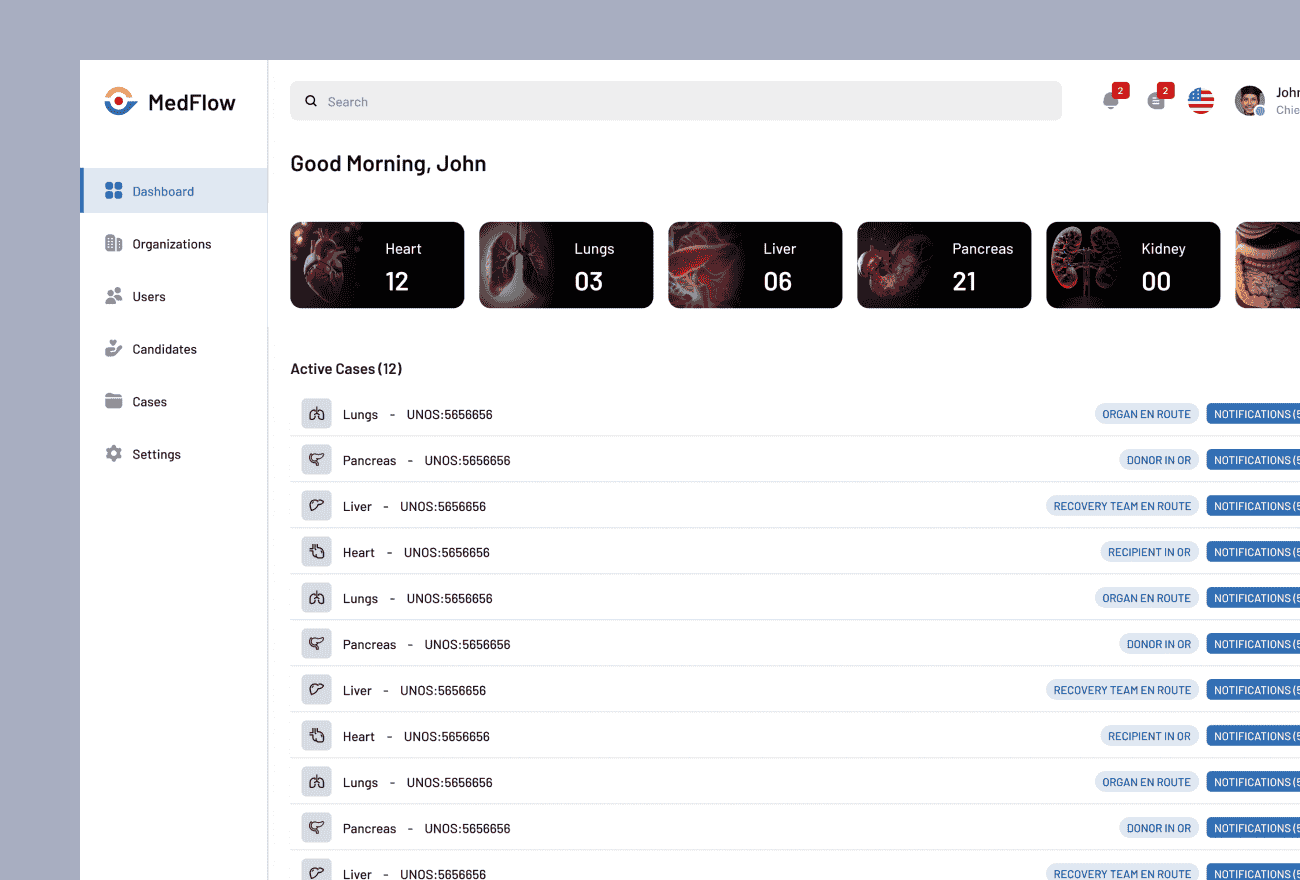
- case management
- user identity
- security roles
- record ownership
- activities
- auditing
- configurable forms
- views
- workflows
- APIs
- integration capabilities
Stackular then extensively customized the platform around the organization's specialized healthcare operations.
The result was not a traditional customer-service CRM.
Dynamics became a purpose-built operational application for managing the organization's healthcare case lifecycle.
Modeling the Complete Case Lifecycle
The central architectural principle was to make the case the system of record for the operational process.
Each case provides a common place to understand:
- what the case is
- who is involved
- which organizations are participating
- what has occurred
- what is currently happening
- what still needs to happen
- who is responsible
- what the final outcome was
The data model was extended to represent specialized healthcare concepts such as:
- organ types
- organ procurement organizations
- transplant centers
- requesting organizations
- donors
- procurement surgeons
- assistants
- perfusionists
- accepting surgeons
- preservation devices
- supply kits
- organ dispositions
- transportation
- travel
- recovery information
- transplant information
- follow-up
- billing
This transformed information that had previously existed largely as spreadsheet columns, emails, notes, and employee knowledge into structured operational data.
Workflow Automation with Power Automate
A major goal of the implementation was to reduce dependence on employees manually remembering every step required to move a case forward.
Stackular used Power Automate, Dynamics workflows, business rules, and application logic to automate portions of the case lifecycle.
Depending on the state of a case, automation can support activities such as:
- creating tasks
- assigning work
- sending reminders
- requesting missing information
- updating statuses
- validating required information
- coordinating handoffs
- notifying team members
- tracking outstanding activities
- initiating follow-up
- supporting billing readiness
Operational workflows include activities such as:
- securing surgeons and assistants
- coordinating perfusionists
- verifying supply-kit availability
- confirming transportation
- communicating with OPOs and transplant centers
- collecting required information
- tracking case milestones
- recording dispositions
- completing follow-up activities
The goal was not to eliminate employees from the process.
It was to eliminate the need for employees to spend time remembering routine process steps, searching for information, reconciling spreadsheets, and manually coordinating predictable activities.
That allowed staff to focus on cases requiring expertise, judgment, communication, or exception handling.
Managing Hundreds of Cases per Day
The redesigned platform ultimately enabled the organization to support hundreds of cases per day.
That scale is an important part of the business outcome.
Under the previous Excel-based process, increasing case volume would have required the organization to add employees simply to keep up with coordination, data entry, tracking, and follow-up.
The Dynamics platform changed that relationship.
As volume increased, structured workflows and automation absorbed a significant portion of the operational overhead.
Employees could manage larger workloads because the system helped:
- organize work
- surface priorities
- track status
- identify missing information
- automate repetitive activities
- maintain a common source of truth
This allowed the organization to increase case capacity without expanding staffing proportionally.
Supporting Revenue Growth Through Operational Scalability
The case-management platform became an important enabler of the organization's growth strategy.
Revenue growth depended on the ability to handle significantly more case volume.
However, revenue growth would have produced limited value if every increase in volume required a similar increase in administrative staffing.
By automating and structuring the operating process, the organization was able to increase case throughput while controlling the staffing required to support that growth.
The system contributed to:
- staff reductions in areas where manual coordination had previously been required
- increased case capacity per employee
- reduced administrative effort per case
- greater process consistency
- more predictable operations
- scalability necessary to support revenue growth
At the resulting volume, the organization would not have been able to operate effectively with its existing staffing model using spreadsheets alone.
The technology therefore did more than make an existing process more efficient.
It changed the organization's operational capacity.
Creating a Single Operational View
Complex cases become difficult to manage when information is fragmented across spreadsheets, inboxes, documents, and individual employees.
The Dynamics implementation created a centralized operational record.
Authorized users can see the current state of a case along with associated:
- people
- organizations
- activities
- statuses
- logistical information
- supplies
- medical devices
- dispositions
- follow-up
- financial information
Instead of asking:
Who has the latest spreadsheet?
or:
Has someone already completed this step?
users work from a shared operational system.
This improves coordination both within individual teams and across handoffs.
Work Queues and Operational Prioritization
At high case volumes, employees cannot simply review every open case individually to determine what requires attention.
The system allows work to be organized using structured status, ownership, activities, and other case information.
Views and operational queues can help employees identify:
- cases requiring action
- overdue activities
- missing information
- unresolved exceptions
- cases assigned to them
- cases requiring specific expertise
- cases approaching important milestones
This changes case management from a largely reactive process into a more structured operational workflow.
Designing for Specialized Healthcare Operations
The solution demonstrates an important principle of enterprise-platform architecture:
Use the platform for common enterprise capabilities and customize the parts that differentiate the business.
Dynamics provides capabilities such as:
- authentication
- authorization
- auditing
- case ownership
- activities
- workflow
- forms
- views
- APIs
Stackular did not need to recreate those capabilities.
Development could instead focus on the customer's specialized domain:
- organ procurement workflows
- transplant-center relationships
- clinical staffing
- medical-device tracking
- logistics
- case disposition
- healthcare-specific operational rules
This allowed the organization to receive the benefits of a commercial enterprise platform without forcing its highly specialized business process into a generic CRM implementation.
HIPAA Compliance and PHI Protection
The case-management platform handles sensitive healthcare information, including Protected Health Information.
Security was therefore treated as part of the application architecture.
The solution operates within the organization's HIPAA-compliant technology environment and uses Microsoft platform capabilities alongside organizational controls to protect PHI.
Important controls include:
- identity-based access
- role-based security
- least-privilege access
- controlled PHI access
- encryption at rest
- encryption in transit
- audit logging
- governed integrations
- managed user access
- controlled reporting
Not every employee needs access to every case or every piece of information.
The security model allows access to be aligned with job responsibilities and operational requirements.
Auditing and Accountability
Moving from spreadsheets to Dynamics also provided significantly better accountability.
Enterprise case-management systems can capture information about:
- who created a record
- who changed it
- when it was changed
- ownership
- activities
- workflow events
- case status
That history is important in any complex operational environment and particularly important when sensitive healthcare data is involved.
Auditing helps support:
- operational troubleshooting
- security reviews
- accountability
- compliance investigations
- process improvement
Operational Reporting
Structured case data also transformed the organization's reporting capabilities.
When operational processes live primarily in spreadsheets, reporting frequently requires manual consolidation and reconciliation.
Dynamics captures structured information as part of normal operations.
That information can be used to analyze:
- case volume
- case status
- case disposition
- organ type
- workload
- participating organizations
- case ownership
- outcomes
- billing status
- activity timing
- operational trends
The application therefore creates analytical data as a by-product of performing the work.
Integration with the Modern Data Platform
Dynamics 365 also serves as an important operational source for the organization's Microsoft Fabric data platform.
The architecture intentionally separates two types of workload.
Dynamics 365
Supports:
- transactional case management
- workflows
- operational users
- current case state
- day-to-day business processes
Microsoft Fabric
Supports:
- historical preservation
- data engineering
- trend analysis
- enterprise analytics
- Power BI
- future AI and predictive workloads
This separation allows each platform to focus on the workload it is designed to perform.
Dynamics runs the business.
Fabric helps the organization understand the business.
Key Technical Decisions
Why Dynamics 365 Instead of a Completely Custom Application?
Building a case-management application from scratch would have required Stackular to create many capabilities already provided by an enterprise platform:
- authentication
- security
- record ownership
- auditing
- workflow
- activities
- configurable forms
- views
- APIs
- administration
Dynamics provided those commodity enterprise capabilities while Dataverse allowed Stackular to create the specialized healthcare model required by the business.
This reduced the amount of custom infrastructure required while retaining substantial flexibility.
Why Use Dynamics Customer Service?
Dynamics Customer Service already provides a mature case-management model.
Stackular extended that foundation instead of treating each healthcare case as an unrelated custom record.
This allowed the solution to retain standard Dynamics concepts such as:
- cases
- ownership
- activities
- queues
- security
- workflow
while extending them with specialized healthcare information and business processes.
Why Replace Excel Instead of Extending It?
Excel is extremely useful for analysis and lightweight collaboration.
It becomes problematic when it is expected to function as a high-volume operational application.
At hundreds of cases per day, requirements such as workflow automation, concurrency, security, auditing, ownership, integrations, exception handling, and real-time status exceed what a spreadsheet-based process is designed to handle.
Why Use Power Automate?
Many case-management activities are deterministic.
When a known event occurs, the system can automatically initiate the next activity.
Power Automate provides a way to implement workflows around Dynamics data without requiring custom code for every process.
This makes it particularly useful for:
- reminders
- notifications
- task creation
- workflow routing
- integration
- status-based actions
Custom development can then be reserved for requirements that actually require it.
Why Structure the Data Instead of Storing Everything in Notes?
Structured information allows software to use the data.
If critical information exists only in free-text notes, email, or spreadsheets, it becomes difficult to automate, validate, filter, report, or analyze.
Modeling concepts such as organ type, OPO, surgeon, disposition, travel time, case status, and follow-up as structured information enables:
- automation
- validation
- search
- reporting
- integrations
- analytics
- future AI capabilities
Why Separate Dynamics from Advanced Analytics?
Dynamics is optimized for transactional workflows.
Advanced analytics requires historical processing, large transformations, trend analysis, and other workloads that have very different characteristics.
Separating the two gives both platforms a clearer role and creates a more scalable overall architecture.
Business Results
Hundreds of Cases per Day
The organization scaled the platform to support hundreds of operational cases per day.
Increased Case Capacity per Employee
Workflow automation and centralized information allowed employees to manage significantly more case volume than would have been possible through the previous Excel-based process.
Lower Staffing Requirements
The organization was able to reduce staffing requirements associated with manual case coordination and avoid adding personnel at the same rate as business growth.
Enabled Revenue Growth
The organization could accept and manage higher case volumes without operational staffing becoming the limiting factor.
The platform became part of the operational foundation that allowed the organization to achieve its revenue-growth objectives.
Reduced Dependence on Spreadsheets
The organization moved a business-critical case-management process from Excel into a governed enterprise application.
Greater Process Consistency
Structured workflows and automation help ensure that required activities are tracked and handled consistently across cases.
Improved Operational Visibility
Employees and management have a centralized view of active cases and operational status.
Structured Enterprise Data
Case information captured during operations can feed Power BI, Microsoft Fabric, management reporting, and advanced analytics.
Reduced Dependence on Institutional Knowledge
Business rules and workflow steps can be represented in the system rather than existing primarily in employees' memory.
HIPAA-Compliant Case Management
Sensitive healthcare operations and PHI are managed within a governed application architecture designed around appropriate security and access controls.
Technologies Used
Lessons for Organizations Modernizing Case Management
Don't Digitize the Spreadsheet. Model the Process.
Replacing an Excel workbook with an application containing the same fields captures only part of the opportunity.
The real benefit comes from modeling:
- relationships
- states
- activities
- responsibilities
- decisions
- rules
- exceptions
That allows software to help run the process rather than simply store information about it.
Automation Changes the Relationship Between Headcount and Growth
Manual operating models tend to scale staffing with transaction volume.
Automation changes that relationship.
If software handles routine coordination, validation, reminders, assignments, and status tracking, employees can manage significantly more work.
That can make technology an enabler of revenue growth rather than simply an IT efficiency project.
Use Platforms for Commodity Capabilities
Identity, auditing, role-based security, workflow, APIs, and basic case management are expensive to recreate and rarely provide competitive differentiation.
Use a platform for those capabilities and concentrate custom development on the processes that make the business unique.
Treat Workflow as Data
Knowing that something happened is useful.
Knowing when it happened, who performed it, what state the case was in, and what happened next provides the foundation for operational analytics and process improvement.
Capture Structured Data During Operations
Reporting is easier when operational systems capture important information in structured form from the beginning.
The best analytical data is often created naturally while employees perform their work.
Healthcare Security Must Be Part of Application Design
PHI protection should influence:
- identity
- authorization
- data models
- integrations
- reporting
- workflow
- auditing
Security cannot be treated as an infrastructure setting added after the application is complete.
Frequently Asked Questions
Can Microsoft Dynamics 365 be used for healthcare case management?
Yes. Dynamics 365 and Dataverse can be extended well beyond traditional CRM scenarios.
Organizations can create specialized healthcare entities, relationships, workflows, security models, activities, and business rules while retaining enterprise capabilities such as case management, auditing, identity, and integration.
Can Dynamics 365 replace spreadsheet-based case management?
Yes, particularly when spreadsheets have effectively become operational applications.
A case-management platform can provide capabilities that spreadsheets are not designed to deliver at scale, including workflow automation, concurrent access, role-based security, auditing, case ownership, queues, business rules, and integrations.
At what point should an organization move case management out of Excel?
There is no single transaction threshold.
Warning signs include:
- multiple people editing the same process
- significant email coordination
- difficulty identifying the latest information
- manual reminders
- growing case volume
- sensitive information requiring stronger security
- reporting that requires manual consolidation
- processes that depend heavily on individual employees remembering what to do next
When the spreadsheet begins functioning as the organization's operational system, it is usually time to evaluate a purpose-built platform.
When should an organization use Dynamics instead of building a custom case-management system?
Dynamics is particularly attractive when the solution requires common enterprise capabilities such as identity, security, workflows, auditing, activities, configurable forms, reporting, and integration while still requiring substantial customization around business-specific workflows.
A completely custom application may make more sense when the required interaction model or architecture differs significantly from the strengths of Dynamics.
How does Power Automate help with case management?
Power Automate can react to changes in case data and perform activities such as:
- creating tasks
- sending notifications
- requesting information
- updating records
- routing work
- coordinating approvals
- triggering integrations
This allows routine workflow to be automated while employees focus on exceptions.
Can Dynamics 365 support hundreds of cases per day?
Yes, when the application, data model, workflows, integrations, and environment are appropriately designed.
The more important scalability question is often not simply whether Dynamics can store the records, but whether the surrounding business process can efficiently handle the workload.
In this implementation, Stackular used automation and structured case management to support hundreds of cases per day without requiring staffing to grow proportionally with case volume.
Can Dynamics 365 be used in a HIPAA-compliant architecture?
Dynamics 365 can be used as part of a HIPAA-compliant environment when the appropriate Microsoft services, contractual arrangements, security controls, identity policies, application design, and organizational procedures are implemented.
HIPAA compliance applies to the complete architecture and operating model, not to the software product alone.
How should PHI access be controlled in a case-management application?
Access should be based on job responsibility and minimum-necessary principles.
Users should receive access to the cases and information required for their role rather than receiving unrestricted access simply because they use the application.
Why is structured case data important for analytics?
Structured data can be grouped, filtered, measured, compared, and analyzed.
When operational information exists only in free-text notes, spreadsheets, or email, extracting reliable insights becomes much harder.
Structured case management creates analytical data naturally while the business operates.
Why separate Dynamics 365 from a data warehouse or Microsoft Fabric?
Dynamics is designed primarily for transactions and operational workflows.
A data platform such as Microsoft Fabric is designed for historical storage, transformation, trend analysis, large-scale analytics, and AI workloads.
Separating those responsibilities gives each platform the workload it is best suited to handle.
Related Services
Related Case Studies
Modern Data Platform for a Healthcare Services Company
A national healthcare services organization relied on Microsoft Dynamics 365 and Dataverse to manage operational case data, including information containing Protected Health Information (PHI).
